PicGo
PicGo has built-in S.EE support, no plugins needed
PicGo is an open-source image and file upload tool for Windows, macOS, and Linux. Recent versions ship with S.EE support out of the box, so you just need an API Token to get started.
Setup
1. Get your API Token
- Log in to your S.EE account
- Go to Tools > API Token
- Generate a new API Token
Don't share your API Token publicly or commit it to version control.
2. Configure PicGo
- Download and install PicGo
- Open PicGo
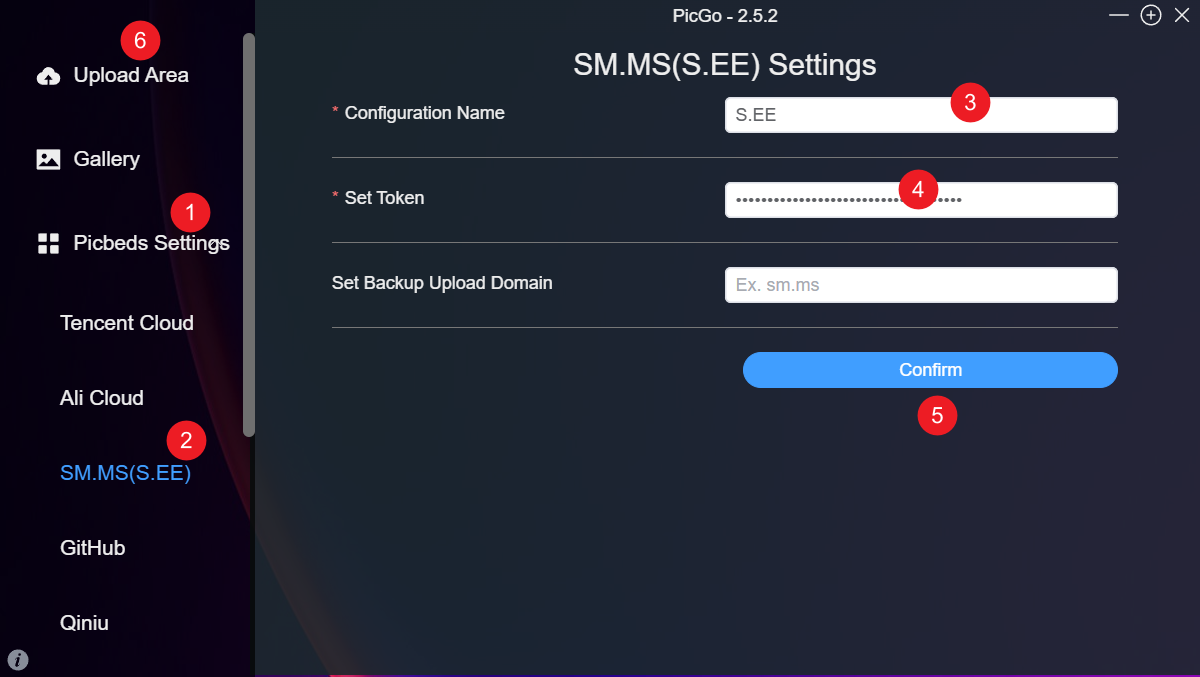
- Go to Picbeds Settings > SM.MS (S.EE)
- Click + to add a new configuration
- Enter a name in Configuration Name (e.g.
S.EE) - Paste your API Token in Set Token
- Click Confirm
Usage
There are a few ways to upload:
- Drag and drop files onto the Upload Area
- Click the Upload Area to pick files from your computer
- Click the floating mini window to upload directly
- Right-click the floating mini window and select Upload by Clipboard
PicGo copies the resulting link to your clipboard. You can choose the format: Markdown, HTML, raw URL, etc.